
Summary
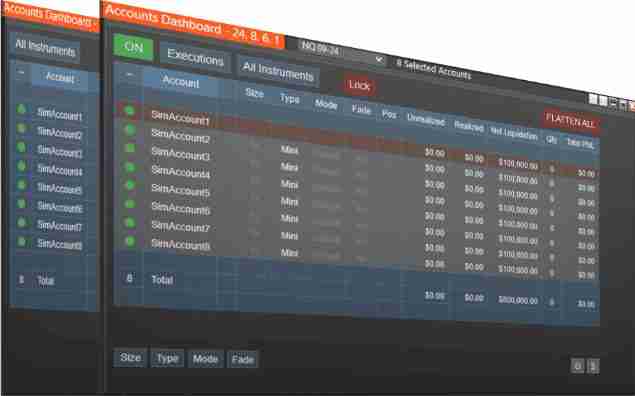
The NinjaTrader Accounts Dashboard Suite is an all-in-one, multi-account management solution for NinjaTrader Desktop. It combines Duplicate Account Actions (our premier trade copier) and Account Risk Manager (our advanced risk-control tool) into a single, streamlined Accounts Dashboard.
From one unified NinjaTrader dashboard, you can copy trades across multiple accounts, customize contract sizing and ATM strategies, and automatically enforce prop-firm-style daily goals and loss limits—everything managed in one place.
🏆 Compare Trade Copier Solutions
Accounts Dashboard Suite Benefits
Save by bundling the premier Duplicate Account Actions trade copier with our top-rated Account Risk Manager. Instead of purchasing each tool separately, the Accounts Dashboard Suite delivers both in a fully integrated NinjaTrader dashboard at a significantly better value.
The Accounts Dashboard Suite includes:
- Executions Mode
Simplifies trade copying by sending market orders to follower accounts when the Master account fills. - Orders Mode
Mirrors all order placements, modifications, targets, and stops for tighter price synchronization. - All Instruments or Single Instrument Control
Copy trades across all markets or restrict copying to a single instrument. - ATM Strategy Assignment
Allows each follower account to run its own ATM strategy configuration. - Unified View of Positions and Orders
Monitor positions and working orders across all accounts in one centralized dashboard. - Fade Mode
Enables selected accounts to take the opposite side of the Master trade—useful for hedging or strategy testing. - Rejected Order Handling
Automatically resubmits rejected follower orders as market or limit orders to maintain account alignment. - Built-In Risk Management
Includes daily goal tracking, daily loss limits, trailing drawdown monitoring, funded goal tracking, and more. - Lifetime Upgrades & Live Chat Support
Ongoing improvements and direct customer assistance whenever needed.
Accounts Dashboard Suite Features
Duplicate Account Actions – NinjaTrader Trade Copier
Duplicate Account Actions is the trade copier included in the Accounts Dashboard Suite. It provides a comprehensive set of tools for synchronizing trades across multiple NinjaTrader accounts, including:
- Flexible tracking for all instruments or a single selected instrument
- Real-time visibility of positions and pending orders across all accounts
- Per-account customization for:
- Contract size
- Contract type (Mini or Micro)
- Copy mode
- Fade settings
- Executions Mode for simple, reliable syncing using market orders based on Master fills
- Orders Mode for tighter entry and exit price alignment by mirroring all order activity
- Automatic rejected order handling that resubmits orders as market or limit orders
Duplicate Account Actions is also available as a standalone trade copier for traders who do not need the additional risk-management features included in the Suite.
Account Risk Manager – NinjaTrader Risk Management
Account Risk Manager is the risk-control tool included in the Accounts Dashboard Suite. It provides automated, per-account risk protection and prop-firm rule support, including:
- Daily goal and daily loss limits that automatically flatten accounts and block further trading for the day
- Automatic funded exit, which flattens an evaluation account once the funded goal plus your buffer is reached
- Trailing drawdown tracking via the From Closed column with color-coded warnings
- One Trade feature for evaluation accounts that require a daily trade after passing
- Exit Shield, which prevents changes that increase risk or reduce reward by protecting stop and target placement
Account Risk Manager is also available as a standalone product for traders who want advanced risk automation without a trade copier.
How to Use the Accounts Dashboard Suite
Everything is managed inside a single, unified NinjaTrader dashboard, making setup and daily use straightforward.
1. Select Your Master and Followers
Choose one Master account and select the accounts you want to follow. The dashboard clearly shows which accounts are active and ready for syncing.
2. Choose Your Copy Mode
Select the mode that fits your workflow:
- Executions Mode sends market entries and exits to follower accounts
- Orders Mode mirrors entry orders, targets, stops, and adjustments
Copy modes can also be customized on a per-account basis.
3. Configure Each Follower Account
Customize how each follower account behaves by setting:
- Position size
- Mini or Micro contract type
- ATM strategy
- Fade (opposite direction), if needed
4. Set Risk Controls
Apply per-account protections such as:
- Daily profit goals
- Daily loss limits
- Trailing drawdown and funded goal tracking
- Exit Shield to prevent unsafe stop or target changes
Accounts that hit their limits are automatically flattened and excluded from further trades for the day.
5. Trade on Your Chart
Place trades directly on NinjaTrader or through platforms connected to NinjaTrader Desktop. The Suite synchronizes executions, manages orders, and enforces your risk rules across all selected accounts.